This blog's third year begins today. I've enjoyed writing and have picked up a number of readers along the way (thank you!). Since I started taking classes and have some new responsibilities, I haven't had much time to write. In any case, I still enjoy writing and will continue sharing news and commentary on my own experience in a commons environment.
Some of the most popular posts over the last three years:
Thanks for reading!

Thursday, July 01, 2010


Thursday, June 24, 2010
Georgia Tech Visit
 Earlier this month while at EDUCUASE Southeast Regional, I had the opportunity to visit Georgia Tech, one of the libraries that inspired the Hub. When I visited last summer, the West Commons was still undergoing renovations. I was delighted this time to see the the finished project which is known as 2 West. While I took a number of pictures during the quiet of summer with a pretty lousy camera, you'll really want to check out their website on 2 West which includes a number of images, concepts, presentations, and process documents related to the project.
What particular
 ly captured my attention are the partitions which create somewhat private spaces yet let light flow through. In our own research commons project, we've been pondering how to create the personal spaces that graduate students crave while avoiding any construction or messing too much with the architectural integrity of our building. I was really impressed by this particular design which included copious outlets and whiteboards, another request from our graduate student survey and focus groups.
If you have the opportunity, I urge you to check out their commons--they have always been so user focused and remain one of the most innovative places around.
What an Honor
I hesitated to post this video, but it includes some terrific footage of the Hub and features a number of friends and colleagues. I am truly honored to be the recipient of the SLA 2010 Dow Jones Leadership Award, described in this video:
Tuesday, June 22, 2010
New Thinking on Commons Signage
 So I was wrong.
Labeled with our signature "help help help" sign, our commons desk offers library and IT assistance as well as any kind of directional assistance you might imagine. In addition to the "traditional" things, we've helped students find their advisors, parents find good restaurants, community members find where to print on transparencies, and so on. You know how it goes, and we're delighted to do it. Anyway, I envisioned this desk as the one desk to rule them all: we'll help you with anything, we'll refer you anywhere, just consider us your first stop when you have a question.
So with that line of thinking, I was adamant that we not define the desk with a bunch of signs. If we start describing what we do, inevitably we leave out something. We also make our users choose--is it an IT question or a library question? it's an IT problem, but it's with a library thing, so where do I go? or maybe I shouldn't even bother asking this person since it's neither (here's a rant from last summer about this very topic). So despite the occasional staff suggestion for something more descriptive at each desk, I insisted that we keep it simple.
And what happens when you keep it simple?
Generally I think it works, but I can't count the number of times we've gotten "I'm not sure if you can help me with this..." or "what kind of help?" or even, "do you work here?" While there is a 20 ft sign labeled "help help help" above our heads, I can see where these patrons are coming from. Is this a library help desk to help me with library things, or is it a desk more like the information desks you see in the hospital? You can give me a room number, but you can't actually diagnose anything? Despite a lot of publicity and frequent mention in orientations, tours, and a variety of campus events, until someone is right in front of us with a need, they don't think about what exactly it is that we do.
So I relented. Let's be more specific on our signs.
That's where the fun begins. What do you call it? Reference, research, information, library, Hub, help, assistance...then there's IT, Information Technology, Customer Support, Customer Service, technology, help...We talked about it at length, as I'm sure you have too, and kept struggling with how to label without limiting and yet be descriptive. We hit upon what I think will be the perfect solution with some simple icons (thank you, Jennifer!).
After settling on "Library Help" and "IT Help," we focused our efforts on a few icons to suggest what these terms might mean. We have a terrific graphics group on campus, and I worked with them to come up with a series of concepts (thank you, Kathryn!). Once we had a few possibilities, I showed them to staff and students and asked for feedback. There was some discussion about using which icons on which signs, and particularly if we should use the old-school library icon, but it seemed right. We tweaked the design a few times, and finally settled on our new look which was just installed last week.
Like the "help help help" sign, the new upper signs are visible from the front and back. In addition, the new design gives us the opportunity to lose all those plastic frames lining the desk--ugh--as the lower signs includes space to post hours and announcements as well as hide the impossible-to-hide cords and cables in our very open desk design.

What do you think?
Sunday, June 20, 2010
Learning Commons Presentation at CNI
I was fortunate to attend this session at the CNI spring meeting. This is definitely worth a look:
Wednesday, May 19, 2010
NYU Library Visit
Last week I had the pleasure of touring NYU's Bobst Library. I have walked by the massive building so many times but had never been inside--it is a very impressive space.
 To complement the 2004 renovation of two floors to create the Brine Library Commons for undergraduates, the library is now undergoing a major renovation on two upper floors to develop a research commons which incorporates significant student feedback into the plan.
See thi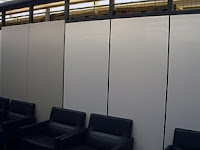 s report for background and this LibGuide for floor plans and other information about the project. The new research commons is scheduled to open in Oct-Nov this year.
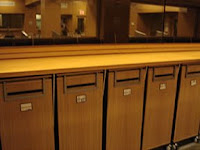
The pictures I took did not do justice to the library, but I did want to highlight a couple of creative additions to various spaces: the whiteboard walls in one collaboration space and the reservable portable storage cabinets in another. Neat ideas, particularly with the storage as we have heard repeatedly from our own graduate students how important it is to have large, lockable storage spaces. I am looking forward to my next visit.
 To complement the 2004 renovation of two floors to create the Brine Library Commons for undergraduates, the library is now undergoing a major renovation on two upper floors to develop a research commons which incorporates significant student feedback into the plan.
See thi
 s report for background and this LibGuide for floor plans and other information about the project. The new research commons is scheduled to open in Oct-Nov this year.
The pictures I took did not do justice to the library, but I did want to highlight a couple of creative additions to various spaces: the whiteboard walls in one collaboration space and the reservable portable storage cabinets in another. Neat ideas, particularly with the storage as we have heard repeatedly from our own graduate students how important it is to have large, lockable storage spaces. I am looking forward to my next visit.
Thursday, April 29, 2010
What I Did During Spring Semester
 It has been pretty evident that the second semester of my doctoral program has kept me quiet on the social media front, including this blog. What little spare time I had this semester was focused on two pretty intense courses. In the theory seminar, I read and commented on the learning theories of a few dozen authors (Bruner, Rogers, Vygotsky, Skinner, and so forth). Some students in the program affectionately call this course the "Book of the Week Club." As I look at the shelf filled with this semester's books, this is not an exaggeration.
This semester's other class focused on research foundations for the field. One of the final projects was a major literature review which could ideally become part of a dissertation proposal. Initially I had planned to write about the use of synchronous electronic communication in an in-person classroom (text messaging, chatting, Twittering, or other backchannel communication as part of the class), but I found few research studies which analyzed the impact (or not) of these technologies o
 n learning. I did uncover some skepticism about the effectiveness of these tools if you consider cognitive load theory and the ability to multitask effectively. As an occasional backchannel participant at a conference, I sometimes find myself distracted from the speaker as I follow and participate in the online discussion. So it is an interesting question--would the use of these tools in the in-person classroom help a student learn (through ease of asking questions, community building, finding additional links and information, etc.) or would it pose as a distraction?
I ended up writing about the use of audience response systems in the in person classroom (aka clickers). This is more of an old-school technology, generally presented asynchronously to the lecture, and the choices are fairly limited (A, B, C, or D for example). There is however a wealth of research literature out there on this technology: 3.7 pounds worth if you are curious. These systems are evolving to offer more options beyond objective measures, and the keypad notion is gradually being replaced with smartphone or laptop applications. I see a lot of opportunities with using these systems in the future, even in the library instruction environment.

That brings me to what I'll be doing this summer--writing a literature review examining the use of interactive technologies in library instruction. I'll also be working on an internship project to update my English LibGuide and related tutorials using instructional design methodology. Hopefully you'll be hearing more from me over the summer, but I suspect these projects along with everything else will keep me pretty busy.
So what's with the photos in this post? The research seminar met in a model classroom, so we were treated to various elementary school science projects, dioramas, and posters throughout the semester. The neatly printed signs around the room were amusing: "This is a door." After some of our hefty discussions, it was good to be reminded.
New Computer Service Desk in the Hub
 This semester Kentucky Trade Computer Services launched their campus location as the official computer service provider for UK students. Conveniently located inside the computer lab in the Hub, they offer computer repairs, upgrades, data recovery, and other related services.

Many commons environments offer hardware services, and I'm glad we were able to add this valuable service to the Hub. Complimenting the services available from the IT help desk, the Hub really is a one-stop shop for student technology assistance.
Check out their website for more information on the services they offer.
Subscribe to:
Posts (Atom)

